Lara Translate + Grok
Connect Lara Translate
with Grok
- Translate in real time within Grok — connect Lara via MCP and get professional-grade translation available on demand inside every conversation, without switching tools.
- 200+ languages, zero friction — Lara's adaptive models handle domain-specific terminology and linguistic nuance, so your multilingual conversations stay accurate from the first message.
- One connection, always available — once configured, Lara runs as a persistent capability inside Grok, ready whenever a translation task comes up.
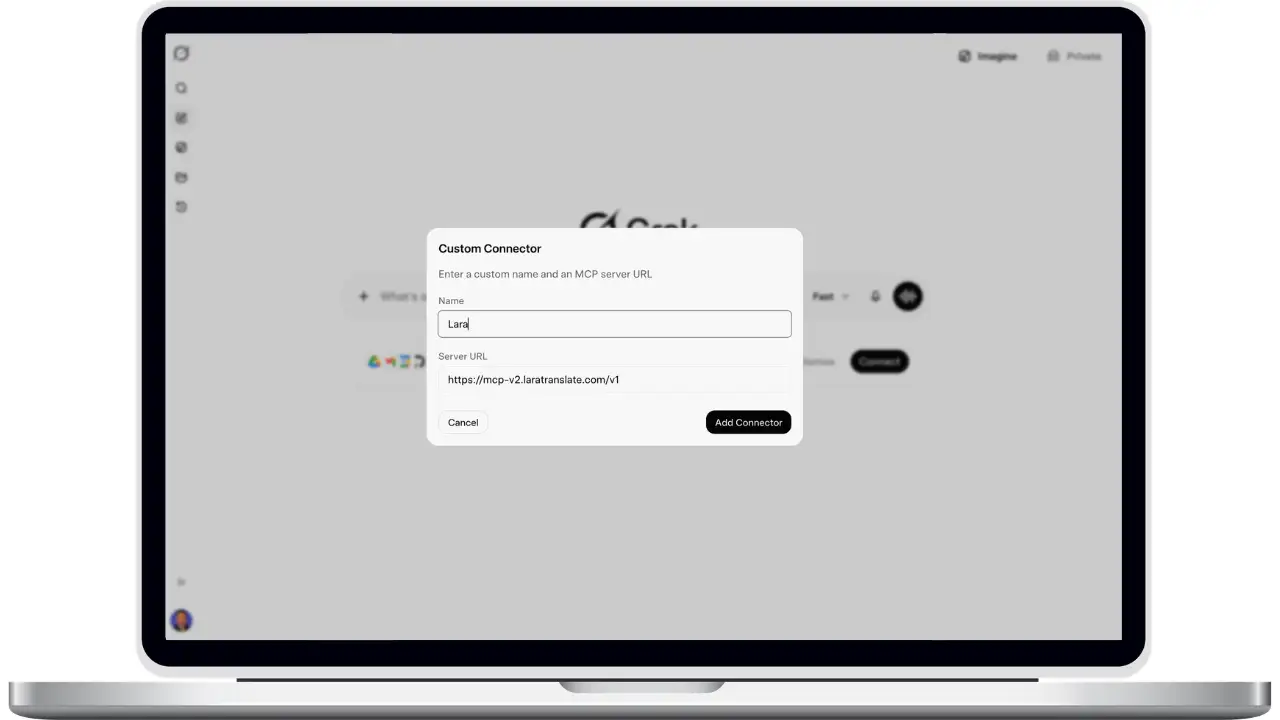
How to connect Lara Translate to Grok
Add Lara as a custom MCP connector in just a few clicks.
1
Open Connectors
Go to Profile → Connectors / MCP Tools in Grok.
2
Add Custom Connector
Click Add Custom Connector, then enter:
Name: Lara
URL:
3
Connect & Log In
Click Add → Connect, then log in with your Lara Translate credentials in the browser window.
4
Done!
Lara Translate is now ready to use. Read documentation.
Frequently Asked Questions
Need assistance?
- For technical support and product inquiries, write to support@laratranslate.com.
- To purchase individual plans, check out our Pricing Page.