Lara Translate + ChatGPT
Connect Lara Translate
with ChatGPT
- Professional translation in every chat: install the Lara Translate app once and ask ChatGPT to translate, detect a language or localize content without copying text into another tool.
- 200+ languages with contextual accuracy: choose a translation style, add context or instructions, and let Lara Think reasoning handle the harder calls, including HTML and XLIFF content.
- Your memories and glossaries, in ChatGPT: work with the translation memories and glossaries in your Lara Translate account so every answer uses your approved terminology.
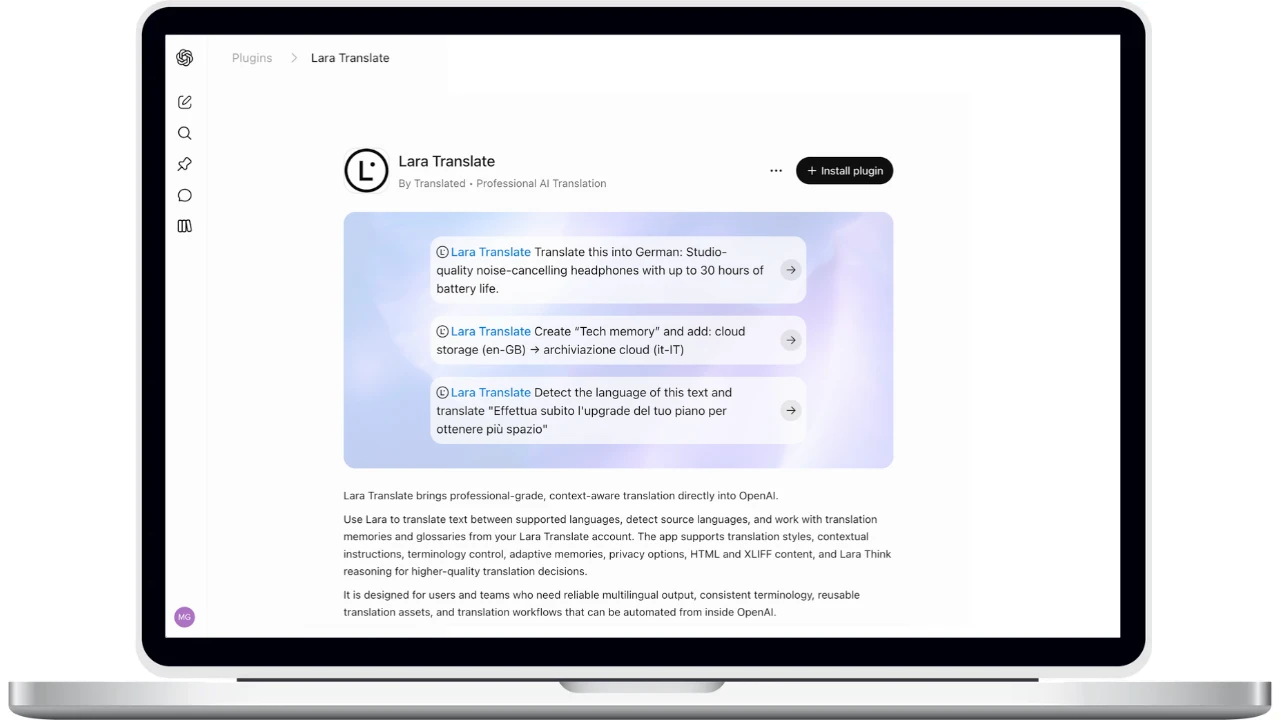
How to connect Lara Translate to ChatGPT
Install the app from the ChatGPT listing and sign in with your Lara Translate account. There are no API keys to paste.
Open the Lara Translate app
Go to the Lara Translate listing on ChatGPT, or search for Lara Translate in ChatGPT's apps directory.
Install the plugin
Click Install plugin and review the permissions. ChatGPT explains what it may share with the app and how to manage it later.
Sign in with Lara Translate
When ChatGPT asks you to connect, log in with your Lara Translate account and authorize access. Your memories and glossaries become available straight away.
Ask for a translation
Prompt ChatGPT as usual, for example “Translate this product description about noise-cancelling headphones into German” or “Detect the language of this message, then translate it into English.” ChatGPT calls the matching Lara Translate tool.
Build your terminology
Ask ChatGPT to create a translation memory or glossary and add approved term pairs, such as a cloud storage term in en-GB and it-IT. Future translations reuse them automatically.
Frequently Asked Questions
Explore other integrations
All integrationsNeed assistance?
- For technical support and product inquiries, write to support@laratranslate.com.
- To purchase individual plans, check out our Pricing Page.