Lara Translate + Wordscope
Connect Lara Translate
with Wordscope
- Streamline Wordscope projects with Lara's AI engine, providing intelligent, context-aware translation suggestions directly inside your browser-based CAT environment.
- Maintain translation consistency using AI-powered assistance while preserving Wordscope's private translation memories, terminology databases, and quality-control tools.
- Accelerate project delivery with automated AI suggestions that sit alongside your review workflow — across Word, Excel, PowerPoint, HTML, InDesign, and SRT.
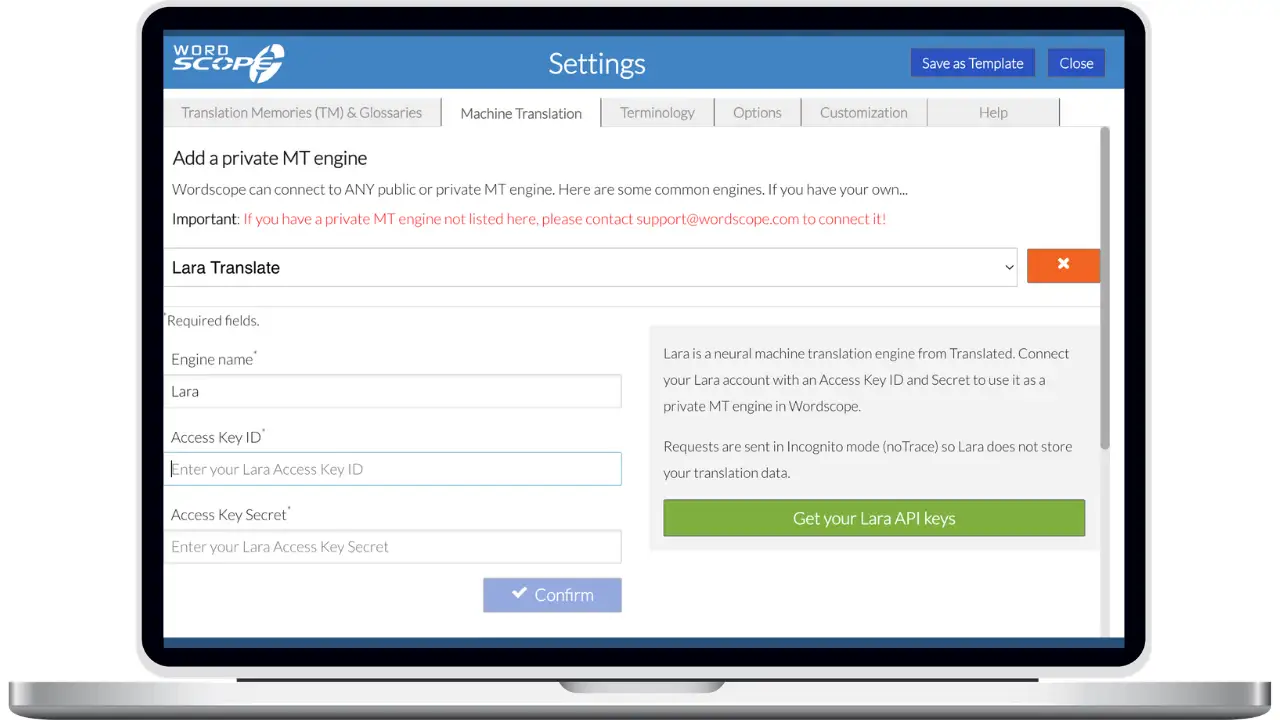
How to connect Lara Translate to Wordscope
Add Lara as a private MT engine in a few minutes with your API credentials.
1
Open Machine Translation
In Wordscope, go to Settings and open the Machine Translation tab.
2
Add a private MT engine
Click Add a private MT engine, then select Lara Translate from the list.
3
Enter your credentials
Paste your Access Key ID and Access Key Secret. Find them in Lara under My Account → API → Credentials.
4
Confirm
Click Confirm. Once the credentials are validated, Lara is ready to use across all your Wordscope projects.
Frequently Asked Questions
Need assistance?
- For technical support and product inquiries, write to support@laratranslate.com.
- To purchase individual plans, check out our Pricing Page.