Lara Translate + Perplexity
Connect Lara Translate
with Perplexity
- Translate inside every Perplexity thread — connect Lara as an MCP connector and get professional-grade translation while you research, without leaving the answer.
- 200+ languages with contextual accuracy — Lara’s adaptive models handle domain-specific terminology, so multilingual research and drafts stay precise from the first prompt.
- Your memories and glossaries, in chat — reuse translation memories and glossaries so Perplexity’s output matches your approved terminology every time.
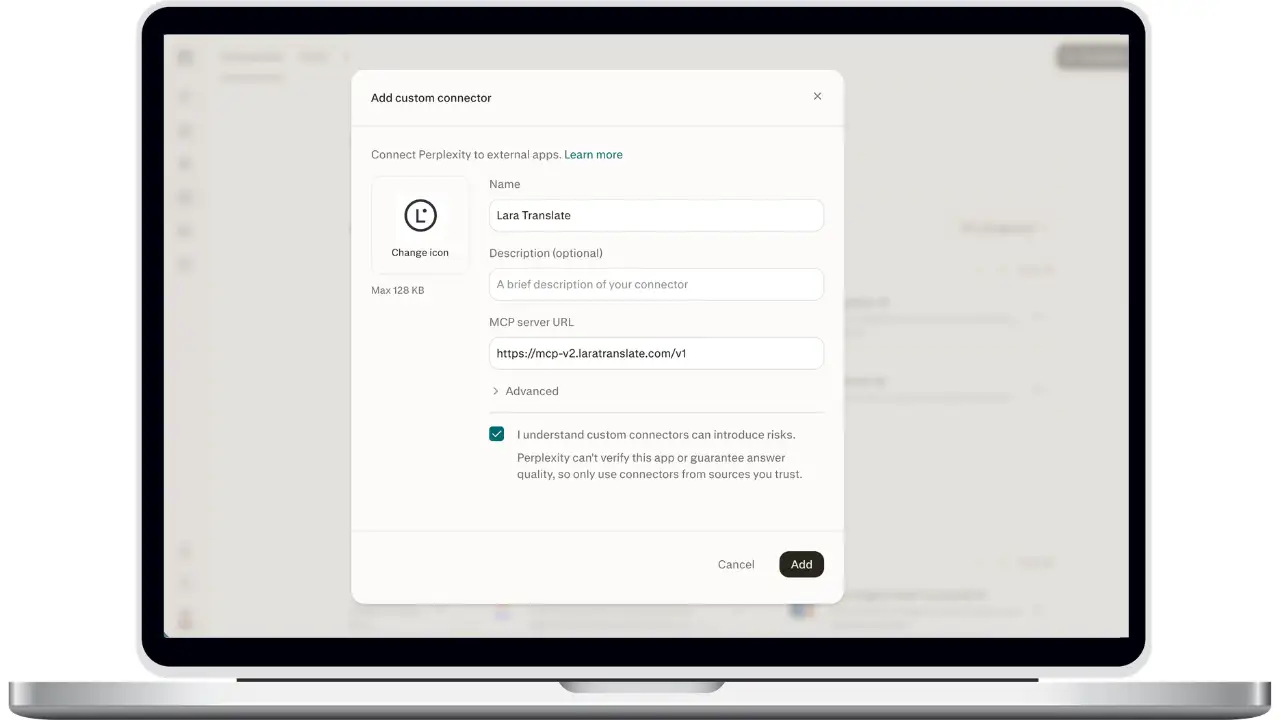
How to connect Lara Translate to Perplexity
Add Lara as a custom MCP connector with OAuth 2.0 — no API keys to paste.
Open Custom connector
In Perplexity, go to the Connectors tab and click Custom connector in the top-right corner, then choose Add MCP connector.
Name it and paste the server URL
In the Add custom connector dialog, enter a name (for example, Lara Translate) and an optional description, paste the Lara MCP server URL , tick the acknowledgement, then click Add.
Open the new connector
Lara Translate now appears in your connector list. Click it, then click Add connector to start the connection.
Sign in with Lara
A login window opens. Sign in with your Lara Translate credentials (email and password, or Google / Apple / SSO). When you see “Authentication Successful”, close the tab.
Confirm the connection
Back in Perplexity, the connector shows Connected together with the Lara account in use. You can switch accounts at any time from the same panel.
Enable Lara in a thread
In the search box, click +, open Connectors, and tick Lara Translate. It stays selected for the thread alongside Web and any other connector.
Ask for a translation
Prompt Perplexity as usual — “translate this paragraph into Italian with a formal tone” or “create a glossary for my brand terms” — and it calls the matching Lara tool.
Frequently Asked Questions
Need assistance?
- For technical support and product inquiries, write to support@laratranslate.com.
- To purchase individual plans, check out our Pricing Page.