Lara Translate + Wordscope
Connect Lara Translate
with Wordscope
- Streamline Wordscope projects with Lara's AI engine, providing intelligent, context-aware translation suggestions directly inside your browser-based CAT environment.
- Maintain translation consistency using AI-powered assistance while preserving Wordscope's private translation memories, terminology databases, and quality-control tools.
- Accelerate project delivery with automated AI suggestions that sit alongside your review workflow — across Word, Excel, PowerPoint, HTML, InDesign, and SRT.
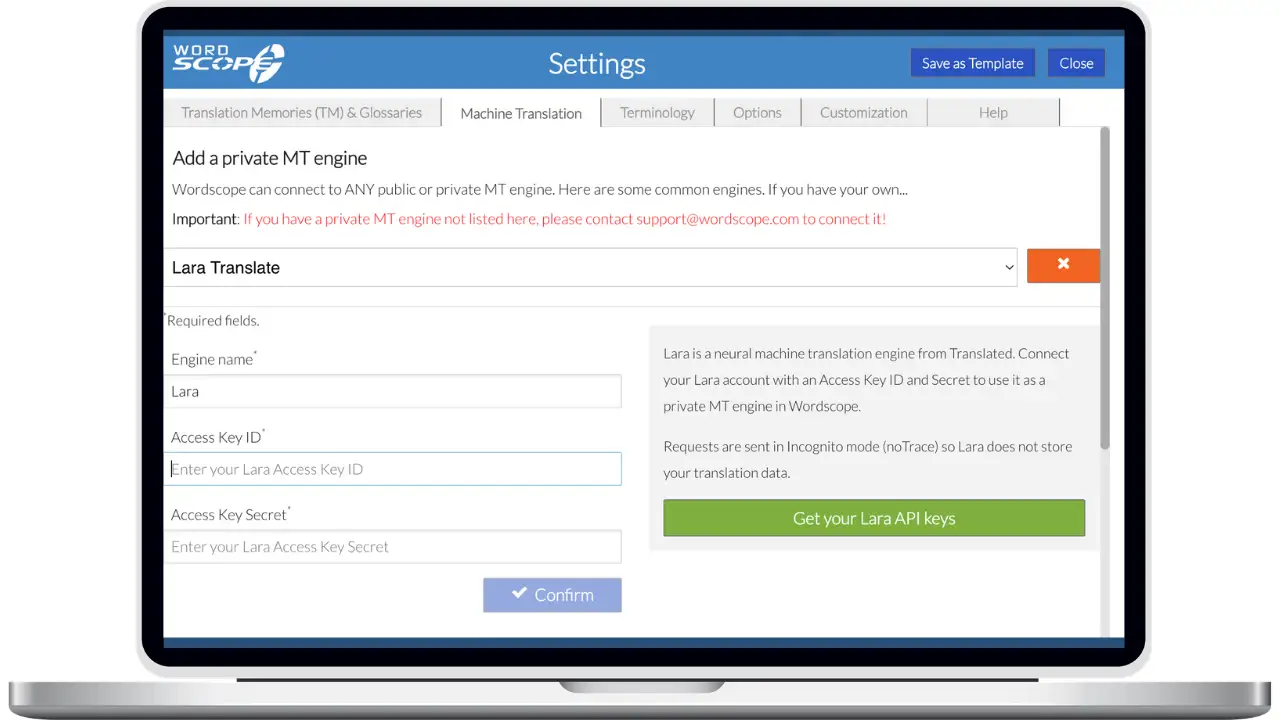
How to connect Lara Translate to Wordscope
Add Lara as a private MT engine in a few minutes with your API credentials.
Open Machine Translation
In Wordscope, go to Settings and open the Machine Translation tab.
Add a private MT engine
Click Add a private MT engine, then select Lara Translate from the list.
Enter your credentials
Paste your Access Key ID and Access Key Secret. Find them in Lara under My Account → API → Credentials.
Confirm
Click Confirm. Once the credentials are validated, Lara is ready to use across all your Wordscope projects.
Frequently Asked Questions
Wordscope is a browser-based CAT tool for professional translators. Connecting Lara as a machine translation engine puts a dedicated, context-aware translation model — covering 200+ languages — directly inside your projects, next to your translation memories, termbases, and QA tools.
An active Lara Translate subscription and your Access Key ID plus Access Key Secret. Generate credentials in Lara under My Account → API → Credentials, then download them immediately — the secret cannot be retrieved again after you leave the page.
Go to Settings → Machine Translation, click Add a private MT engine, select Lara Translate, enter your keys, and confirm. After validation, Lara is available on every Wordscope project. For the full walkthrough, see Using Lara Translate in Wordscope in the Lara Knowledge Base.
Lara runs inside Wordscope, so any format Wordscope already supports is compatible — including Word, Excel, PowerPoint, HTML, InDesign, and SRT subtitles — while the original layout is retained.
Explore other integrations
All integrationsNeed assistance?
- For technical support and product inquiries, write to support@laratranslate.com.
- To purchase individual plans, check out our Pricing Page.